

Required settings
- REST Catalog URI
- Authentication (Bearer token or OAuth2)
- Catalog name
Databricks Unity catalog
To configure Unity catalog as a REST catalog, you will need to do the following:- Enable external data access
- Modify the service principal to have the following permissions:
EXTERNAL USE SCHEMA,EXTERNAL USE LOCATIONUSE CATALOG,USE SCHEMASELECTMANAGE,CREATE SCHEMA,CREATE TABLE,MODIFY,WRITE VOLUME
- REST Catalog URI (
https://{{DATABRICKS_INSTANCE_URL}}/api/2.1/unity-catalog/iceberg-rest) - Catalog name
Authentication
- Bearer token
- OAuth2 M2M
To generate a bearer token, you’ll want to generate a personal access token:Go into your workspace and do the following: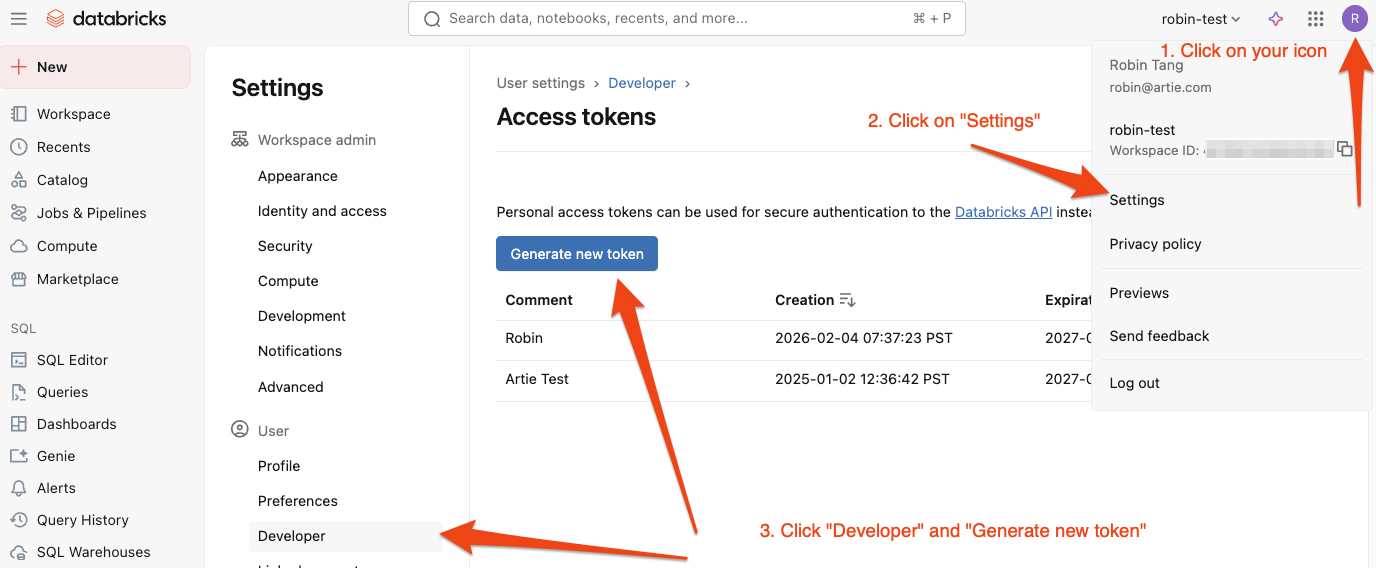
- Click on your username in the top bar and select Settings from the dropdown.
- Click Developer
- Click Access tokens then Generate new token
- (Optional) Provide a description for the token and if you set expiration, make sure to note it down.