> ## Documentation Index
> Fetch the complete documentation index at: https://artie.com/docs/llms.txt
> Use this file to discover all available pages before exploring further.
# PlanetScale Source Connector
> Connect PlanetScale to Artie for real-time CDC using the Vitess VStream API. No binlog configuration required.
## Before you begin
You will need:
* A PlanetScale account with access to the database you want to replicate
* Permission to create database passwords in the PlanetScale console
## Setup
In the [PlanetScale console](https://app.planetscale.com), go to your database and select **Settings → Passwords → New password**.
Set the **Role** to **Read-only**. This is the least-privilege role needed — it grants `SELECT` access for snapshot backfills and VStream CDC access for ongoing replication.
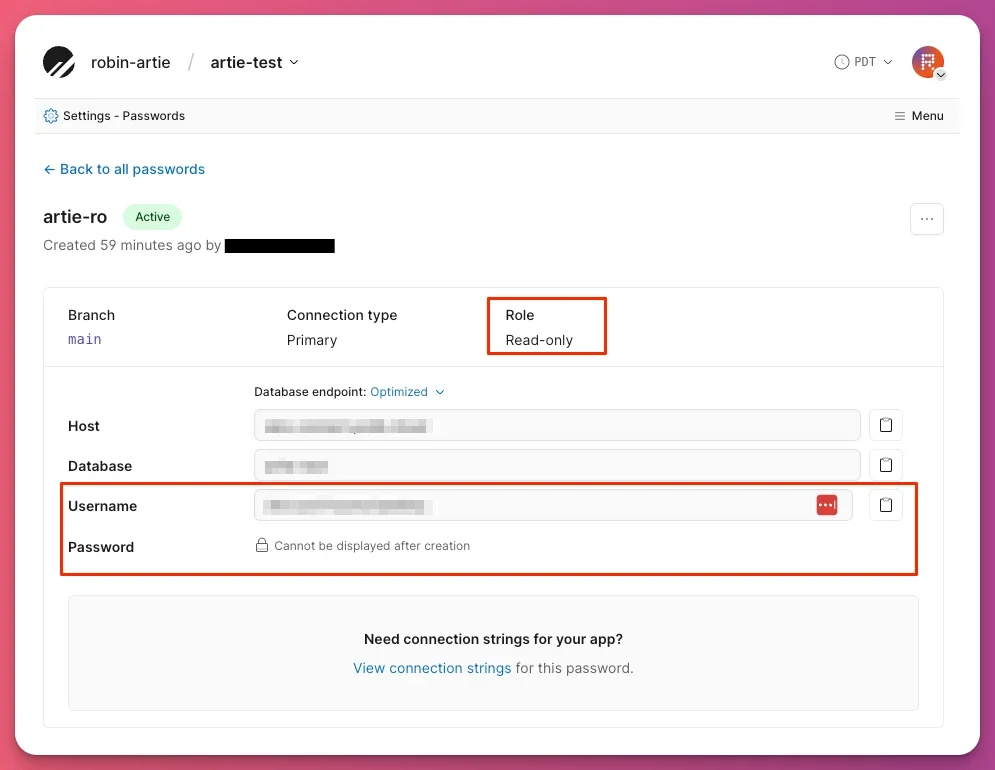 After saving, copy the **Host**, **Username**, and **Password** values shown. You will need these in the next step.
In the Artie dashboard, create a new pipeline and select **PlanetScale** as the source. Enter the credentials from the previous step:
| Field | Value |
| -------- | ---------------------------------------------------------------------- |
| Host | Shown on the PlanetScale password page (e.g. `aws.connect.psdb.cloud`) |
| Port | `3306` |
| Username | Shown on the PlanetScale password page |
| Password | Shown on the PlanetScale password page |
| Database | Your PlanetScale database name (this is also your branch name) |
TLS is enforced automatically — no additional configuration is needed.
## Frequently asked questions
### Does Artie use MySQL binlog for PlanetScale?
No. Artie uses the Vitess **VStream gRPC API** for PlanetScale CDC, not MySQL binary log replication. You do not need to configure `binlog_format`, set binlog retention, or grant `REPLICATION CLIENT` or `REPLICATION SLAVE` privileges.
### What role does the database password need?
**Read-only** is sufficient for both snapshot backfills and ongoing CDC. Do not use Read/Write or Admin roles.
### Is GTID required?
No. VStream-based CDC does not use GTID.
### Are read replicas supported?
No. PlanetScale handles read routing internally — no replica configuration is needed on the Artie side.
### What MySQL version does PlanetScale expose?
PlanetScale exposes a MySQL 8.0-compatible interface via the Vitess layer.
## Advanced
PlanetScale CDC uses the **Vitess VStream gRPC API** rather than MySQL binary log replication. VStream is a change stream protocol built into Vitess that surfaces row-level changes without requiring direct binlog access.
This means Artie does not need replication privileges, binlog configuration, or GTID — all of which are required for standard MySQL CDC. TLS is always enforced on PlanetScale connections; Artie sets this automatically.
After saving, copy the **Host**, **Username**, and **Password** values shown. You will need these in the next step.
In the Artie dashboard, create a new pipeline and select **PlanetScale** as the source. Enter the credentials from the previous step:
| Field | Value |
| -------- | ---------------------------------------------------------------------- |
| Host | Shown on the PlanetScale password page (e.g. `aws.connect.psdb.cloud`) |
| Port | `3306` |
| Username | Shown on the PlanetScale password page |
| Password | Shown on the PlanetScale password page |
| Database | Your PlanetScale database name (this is also your branch name) |
TLS is enforced automatically — no additional configuration is needed.
## Frequently asked questions
### Does Artie use MySQL binlog for PlanetScale?
No. Artie uses the Vitess **VStream gRPC API** for PlanetScale CDC, not MySQL binary log replication. You do not need to configure `binlog_format`, set binlog retention, or grant `REPLICATION CLIENT` or `REPLICATION SLAVE` privileges.
### What role does the database password need?
**Read-only** is sufficient for both snapshot backfills and ongoing CDC. Do not use Read/Write or Admin roles.
### Is GTID required?
No. VStream-based CDC does not use GTID.
### Are read replicas supported?
No. PlanetScale handles read routing internally — no replica configuration is needed on the Artie side.
### What MySQL version does PlanetScale expose?
PlanetScale exposes a MySQL 8.0-compatible interface via the Vitess layer.
## Advanced
PlanetScale CDC uses the **Vitess VStream gRPC API** rather than MySQL binary log replication. VStream is a change stream protocol built into Vitess that surfaces row-level changes without requiring direct binlog access.
This means Artie does not need replication privileges, binlog configuration, or GTID — all of which are required for standard MySQL CDC. TLS is always enforced on PlanetScale connections; Artie sets this automatically.