> ## Documentation Index
> Fetch the complete documentation index at: https://artie.com/docs/llms.txt
> Use this file to discover all available pages before exploring further.
# MongoDB
> Learn how to use Artie to replicate data from MongoDB via change streams.
Artie syncs data directly from MongoDB [change streams](https://www.mongodb.com/docs/manual/changeStreams/), capturing insert, update, and delete operations in real-time.
MongoDB server **must** be in a replica set. If your pipeline only has a `standalone` server, you can create a replica set with one member.
Need help? Check out this [guide](https://www.mongodb.com/docs/manual/tutorial/convert-standalone-to-replica-set/).
Using AWS DocumentDB? See our [DocumentDB guide](/sources/documentdb) instead.
## Required settings
* Connection string
* Service account
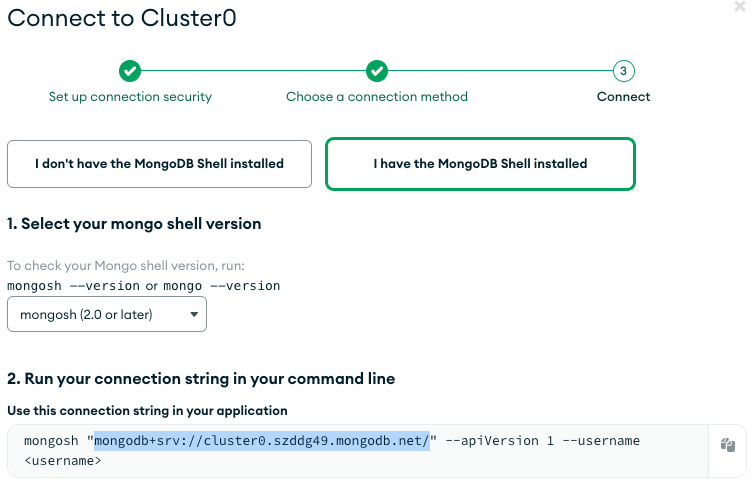
### Connection string
1. Go to Atlas UI
2. Find your pipeline and click "Connect"
We support both MongoDB SRV format or standard connection string.
 ### Service account
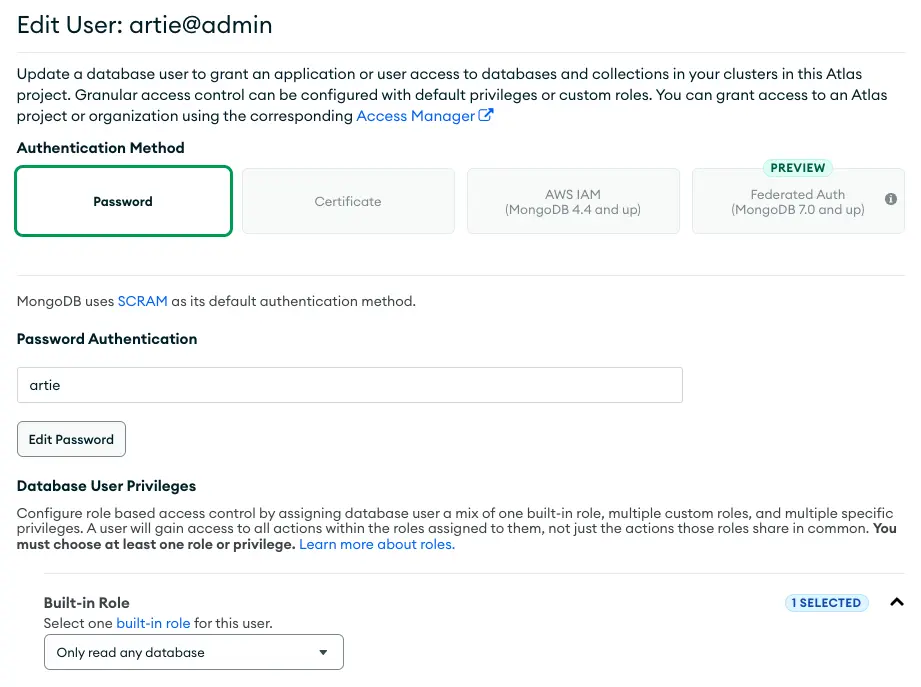
You can create a service account through the Atlas UI or by running a script.
* Click on `Database Access` on the left
* Click on `Add New Database User`
* Under `Database User Privileges`, open `Built-in Role` and Select `Only read any database`
### Service account
You can create a service account through the Atlas UI or by running a script.
* Click on `Database Access` on the left
* Click on `Add New Database User`
* Under `Database User Privileges`, open `Built-in Role` and Select `Only read any database`
 ```js theme={null}
/* If the user does not exist. */
use admin;
db.createUser({ user: "artie", pwd: "", roles: ["readAnyDatabase", { role: "read", db: "local" }] });
/* If the user already exists */
db.updateUser("artie", { roles: ["readAnyDatabase", { role: "read", db: "local" }] });
```
## Advanced
This feature requires MongoDB 6.0 or later.
If you are replicating a MongoDB collection into a partitioned table downstream, you will want to consider enabling this so that the full document before change is available for deletes.
This is because we will need the previous row to grab the partitioned field(s) in order to select the right partition downstream.
To enable this, you'll want to run the following commands:
```js theme={null}
// Enable preAndPostImage on the replica set
use admin;
db.runCommand({
setClusterParameter: {
changeStreamOptions: {
preAndPostImages: {
expireAfterSeconds: 100
}
}
}
});
// Enable preAndPostImage on the collection
use databaseName;
db.runCommand({ collMod:"collectionName",changeStreamPreAndPostImages: { enabled: true } });
// See the previous setting
db.adminCommand( { getClusterParameter: "changeStreamOptions" } );
// To disable this behavior, you can set expiredAfterSeconds to off
db.runCommand( {
setClusterParameter:
{ changeStreamOptions: {
preAndPostImages: { expireAfterSeconds: 'off' }
} }
} );
```
**Data types:** Artie determines the data type for each field by looking at the first non-null value and using its BSON type. This type is then mapped to the appropriate destination column type.
**Mixed-type fields:** If the same field contains different BSON types across documents (for example, `age: 25` in one document and `age: "twenty-five"` in another), Artie will land that field as a **string** in the destination. You can cast it to the desired type downstream.
**Sparse / dynamic fields:** MongoDB collections often have documents with different sets of keys. Artie unions the schema across all observed documents. Fields that are absent from a given document are written as `NULL` in the destination.
**Nested objects:** Nested documents and arrays are preserved as JSON objects in the destination. Artie does not flatten or unfurl nested structures into separate columns.
For example, if the source document contains:
```json theme={null}
{
"test_nested_object": {
"a": {"b": {"c": "hello"}},
"test_timestamp": {"$timestamp": { "t": 1678929517, "i": 1 }},
"super_nested": {
"test_timestamp": {"$timestamp": { "t": 1678929517, "i": 1 }},
"foo": "bar"
}
}
}
```
Artie will output `test_nested_object` as:
```json theme={null}
{
"a": {
"b": {
"c": "hello"
}
},
"super_nested": {
"foo": "bar",
"test_timestamp": "2023-03-16T01:18:37Z"
},
"test_timestamp": "2023-03-16T01:18:37Z"
}
```
Note that BSON-specific types (like `$timestamp`) are converted to standard formats. If the destination does not support a `VARIANT` or semi-structured type, the nested object will be stored as a JSON string.
MongoDB collections have no enforced schema, so different documents can store the same field with different types. By default, Artie infers the column type from the first non-null value it sees. If a later document stores that field with a different type, Artie lands the column as a string.
The **Cast all columns to string** setting makes this explicit: every column is stored as a string as it is discovered, regardless of the underlying BSON type. Nested objects are stored as JSON strings.
This setting applies to new columns as they are discovered. Existing destination columns keep their current types. To cast all columns as strings on a pipeline with an existing destination table, rebuild the table after enabling this setting.
You can enable this from your pipeline's destination advanced settings.
```js theme={null}
/* If the user does not exist. */
use admin;
db.createUser({ user: "artie", pwd: "", roles: ["readAnyDatabase", { role: "read", db: "local" }] });
/* If the user already exists */
db.updateUser("artie", { roles: ["readAnyDatabase", { role: "read", db: "local" }] });
```
## Advanced
This feature requires MongoDB 6.0 or later.
If you are replicating a MongoDB collection into a partitioned table downstream, you will want to consider enabling this so that the full document before change is available for deletes.
This is because we will need the previous row to grab the partitioned field(s) in order to select the right partition downstream.
To enable this, you'll want to run the following commands:
```js theme={null}
// Enable preAndPostImage on the replica set
use admin;
db.runCommand({
setClusterParameter: {
changeStreamOptions: {
preAndPostImages: {
expireAfterSeconds: 100
}
}
}
});
// Enable preAndPostImage on the collection
use databaseName;
db.runCommand({ collMod:"collectionName",changeStreamPreAndPostImages: { enabled: true } });
// See the previous setting
db.adminCommand( { getClusterParameter: "changeStreamOptions" } );
// To disable this behavior, you can set expiredAfterSeconds to off
db.runCommand( {
setClusterParameter:
{ changeStreamOptions: {
preAndPostImages: { expireAfterSeconds: 'off' }
} }
} );
```
**Data types:** Artie determines the data type for each field by looking at the first non-null value and using its BSON type. This type is then mapped to the appropriate destination column type.
**Mixed-type fields:** If the same field contains different BSON types across documents (for example, `age: 25` in one document and `age: "twenty-five"` in another), Artie will land that field as a **string** in the destination. You can cast it to the desired type downstream.
**Sparse / dynamic fields:** MongoDB collections often have documents with different sets of keys. Artie unions the schema across all observed documents. Fields that are absent from a given document are written as `NULL` in the destination.
**Nested objects:** Nested documents and arrays are preserved as JSON objects in the destination. Artie does not flatten or unfurl nested structures into separate columns.
For example, if the source document contains:
```json theme={null}
{
"test_nested_object": {
"a": {"b": {"c": "hello"}},
"test_timestamp": {"$timestamp": { "t": 1678929517, "i": 1 }},
"super_nested": {
"test_timestamp": {"$timestamp": { "t": 1678929517, "i": 1 }},
"foo": "bar"
}
}
}
```
Artie will output `test_nested_object` as:
```json theme={null}
{
"a": {
"b": {
"c": "hello"
}
},
"super_nested": {
"foo": "bar",
"test_timestamp": "2023-03-16T01:18:37Z"
},
"test_timestamp": "2023-03-16T01:18:37Z"
}
```
Note that BSON-specific types (like `$timestamp`) are converted to standard formats. If the destination does not support a `VARIANT` or semi-structured type, the nested object will be stored as a JSON string.
MongoDB collections have no enforced schema, so different documents can store the same field with different types. By default, Artie infers the column type from the first non-null value it sees. If a later document stores that field with a different type, Artie lands the column as a string.
The **Cast all columns to string** setting makes this explicit: every column is stored as a string as it is discovered, regardless of the underlying BSON type. Nested objects are stored as JSON strings.
This setting applies to new columns as they are discovered. Existing destination columns keep their current types. To cast all columns as strings on a pipeline with an existing destination table, rebuild the table after enabling this setting.
You can enable this from your pipeline's destination advanced settings.