> ## Documentation Index
> Fetch the complete documentation index at: https://artie.com/docs/llms.txt
> Use this file to discover all available pages before exploring further.
# Active transaction log via SQL access
## Overview
With this method, Artie will read from the active transaction log via SQL access. This method is only available to SQL Server on VM and Azure managed instances.
### Requirements
1. Database recovery model must be set to `FULL` or `BULK_LOGGED`
2. Our service account must have sysadmin permission
3. Each replicated table must have supplemental logging enabled
4. Each replicated table must have a primary key
5. Azure blob storage (as a storage location if using Azure managed instance)
### Supplemental logging
SQL Server requires supplemental logging to capture complete row changes for replication:
* **Default behavior**: Without supplemental logging, SQL Server only emits values for modified columns, not the entire row
* **Required for Artie**: Supplemental logging must be enabled to capture complete row changes during replication
* **Implementation options**:
* Enable CDC on each table you want to replicate (then disable the capture process, so no changes accumulate in the transaction log)
### Configuring this in the Artie dashboard
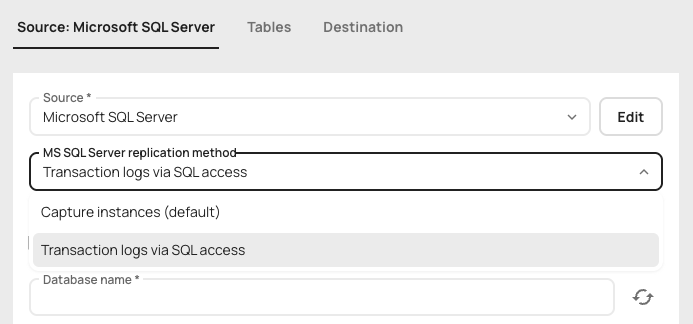
To configure Artie to use this method, change the replication method to "Transaction logs via SQL access" in the source tab.
 We recommend enabling supplemental logging by enabling CDC and then disabling the capture jobs so no changes accumulate in the `cdc` schema.
```sql theme={null}
-- Enable CDC on the database
USE [DATABASE_NAME];
GO
EXEC sys.sp_cdc_enable_db;
GO
-- Then enable CDC for each table:
EXEC sys.sp_cdc_enable_table @source_schema = N'MySchema', @source_name = N'MyTable', @role_name = null;
GO
-- Make sure to disable capture to avoid accumulating changes in the "cdc" schema.
EXEC sp_cdc_drop_job @job_type = N'capture'
GO
```
We recommend enabling supplemental logging by enabling CDC and then disabling the capture jobs so no changes accumulate in the `cdc` schema.
```sql theme={null}
-- Enable CDC on the database
USE [DATABASE_NAME];
GO
EXEC sys.sp_cdc_enable_db;
GO
-- Then enable CDC for each table:
EXEC sys.sp_cdc_enable_table @source_schema = N'MySchema', @source_name = N'MyTable', @role_name = null;
GO
-- Make sure to disable capture to avoid accumulating changes in the "cdc" schema.
EXEC sp_cdc_drop_job @job_type = N'capture'
GO
```