> ## Documentation Index
> Fetch the complete documentation index at: https://artie.com/docs/llms.txt
> Use this file to discover all available pages before exploring further.
# Pipelines
> Learn how Artie pipelines replicate data from your source to your destination in real time.
A pipeline connects a source database to a destination and continuously streams changes. Once created, a pipeline handles initial backfills, schema evolution, and ongoing replication without manual intervention.
```mermaid theme={null}
graph LR
subgraph shared [Shared Source Reader]
SR[Source Reader]
DB[(Source DB)]
DB --> SR
end
subgraph pipelineA [Pipeline A]
DA[Destination Connector A]
end
subgraph pipelineB [Pipeline B]
DB2[Destination Connector B]
end
SR --> DA
SR --> DB2
```
Each pipeline consists of:
* **Source reader** - Connects to your source database and captures changes via CDC. A source reader can be shared across multiple pipelines so your database is only read once.
* **Destination connector** - Writes changes to a specific destination (e.g. Snowflake, BigQuery, S3).
You can monitor pipeline health, throughput, and latency from the [analytics portal](/monitoring/analytics-portal).
## Writing to multiple destinations
Artie supports reading from a single source and writing to multiple destinations in parallel - for example, streaming changes to both S3 and Snowflake simultaneously. This is configured by creating multiple pipelines that share the same source reader, so your source database is only read once regardless of how many destinations you have.
This feature is currently available through [Terraform](https://registry.terraform.io/providers/artie-labs/artie/latest/docs/resources/source_reader).
To set it up, create `artie_source_reader` resource and reference it across multiple `artie_pipeline` resources.
## Pausing and resuming
You can pause a pipeline at any time from the pipeline overview page. Artie offers two pause modes:
* **Pause writing only** - Artie stops writing to the destination but continues capturing changes from the source. Events accumulate in Kafka, so no data is lost. If you resume within 14 days, all queued changes are applied in order and no backfill is needed.
* **Pause reading & writing** - Artie stops both reading from the source and writing to the destination entirely. No new changes are captured while paused.
 You can also pause individual tables within a pipeline from the tables tab in the pipeline editor.
 ## Message compression
Message compression reduces the number of rows silently skipped due to Kafka's message size limit by compressing the entire Kafka message value before the size check runs.
Without compression, Artie measures the raw (uncompressed) byte size of each message and drops any that exceed the per-message limit (default 2 MB). A large JSON column can push a row over that limit even when the actual information is modest. With message compression enabled, Artie compresses the value first, measures the compressed size, and only skips the row if the compressed payload still exceeds the limit — which is far less common. If you want to be notified when rows are skipped, enable [pipeline webhooks](/api/webhook-outgoing-payload).
### Limitations
* **Mutually exclusive with column compression.** Message compression and [column compression](/pipelines/tables#compress-certain-columns) cannot both be active on the same pipeline. Enabling one requires the other to be off.
### Enabling message compression
1. In the dashboard, open your pipeline and go to **Edit** → **Source** tab.
2. Toggle **Message compression** on.
3. Save the pipeline.
## Autopilot
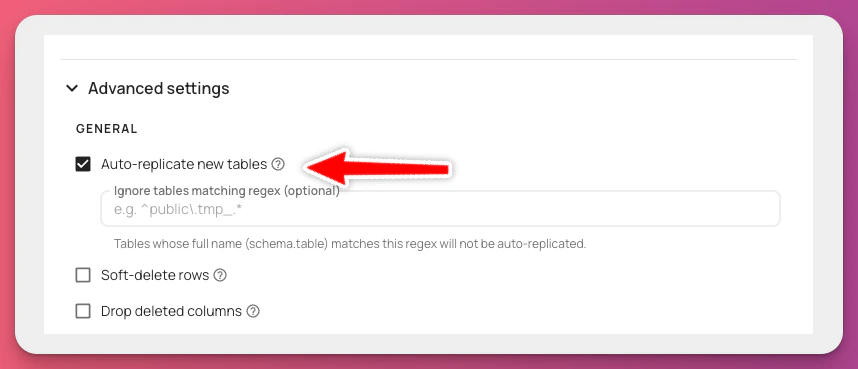
Autopilot is a feature that will automatically replicate new tables from your source database.
To enable autopilot:
1. Go to the pipeline editor
2. Click on the `Destination` tab
3. Click on the `Advanced settings` tab
4. Enable `Auto-replicate new tables`
## Message compression
Message compression reduces the number of rows silently skipped due to Kafka's message size limit by compressing the entire Kafka message value before the size check runs.
Without compression, Artie measures the raw (uncompressed) byte size of each message and drops any that exceed the per-message limit (default 2 MB). A large JSON column can push a row over that limit even when the actual information is modest. With message compression enabled, Artie compresses the value first, measures the compressed size, and only skips the row if the compressed payload still exceeds the limit — which is far less common. If you want to be notified when rows are skipped, enable [pipeline webhooks](/api/webhook-outgoing-payload).
### Limitations
* **Mutually exclusive with column compression.** Message compression and [column compression](/pipelines/tables#compress-certain-columns) cannot both be active on the same pipeline. Enabling one requires the other to be off.
### Enabling message compression
1. In the dashboard, open your pipeline and go to **Edit** → **Source** tab.
2. Toggle **Message compression** on.
3. Save the pipeline.
## Autopilot
Autopilot is a feature that will automatically replicate new tables from your source database.
To enable autopilot:
1. Go to the pipeline editor
2. Click on the `Destination` tab
3. Click on the `Advanced settings` tab
4. Enable `Auto-replicate new tables`
 ## Disable alert emails
By default, Artie sends outbound email alerts when a pipeline encounters issues such as connection failures, replication errors, or sustained ingestion lag. If a particular pipeline generates noise you want to suppress — for example, a non-critical staging pipeline — you can disable alert emails per pipeline without affecting any other monitoring.
To enable this setting:
1. Go to the pipeline editor.
2. Click on the **Destination** tab.
3. Click on the **Advanced settings** tab.
4. Enable **Disable alert emails**.
Disabling alert emails only suppresses outbound email notifications for this pipeline. Artie continues to evaluate alert conditions and update health and status cards in the dashboard, so you still have full visibility into pipeline health. This setting has no effect on [PagerDuty custom monitors](https://www.pagerduty.com/) or other third-party integrations you have configured.
When this setting is on, you will **not** receive email notifications if this pipeline stops replicating, loses its connection, or falls behind. Make sure you have an alternative way to monitor the pipeline (e.g. the [analytics portal](/monitoring/analytics-portal) or [webhooks](/monitoring/webhooks)) before enabling this.
## Disable alert emails
By default, Artie sends outbound email alerts when a pipeline encounters issues such as connection failures, replication errors, or sustained ingestion lag. If a particular pipeline generates noise you want to suppress — for example, a non-critical staging pipeline — you can disable alert emails per pipeline without affecting any other monitoring.
To enable this setting:
1. Go to the pipeline editor.
2. Click on the **Destination** tab.
3. Click on the **Advanced settings** tab.
4. Enable **Disable alert emails**.
Disabling alert emails only suppresses outbound email notifications for this pipeline. Artie continues to evaluate alert conditions and update health and status cards in the dashboard, so you still have full visibility into pipeline health. This setting has no effect on [PagerDuty custom monitors](https://www.pagerduty.com/) or other third-party integrations you have configured.
When this setting is on, you will **not** receive email notifications if this pipeline stops replicating, loses its connection, or falls behind. Make sure you have an alternative way to monitor the pipeline (e.g. the [analytics portal](/monitoring/analytics-portal) or [webhooks](/monitoring/webhooks)) before enabling this.