> ## Documentation Index
> Fetch the complete documentation index at: https://artie.com/docs/llms.txt
> Use this file to discover all available pages before exploring further.
# Soft partitioning
> A logical partitioning strategy implemented at the ingestion layer for improved performance and data management
# Soft Partitioning
Soft partitioning is a logical partitioning strategy implemented at the ingestion layer rather than relying on native database partitioning features. Instead of storing all rows for a given entity in a single large table, we split data into time-based "partition" tables and expose them through a unified view.
# Currently Supported Destinations
* **Redshift**
* **Snowflake**
## Why Soft Partitioning?
While some databases support native partitioning, others have limitations that make them ineffective for ingestion workloads:
### PostgreSQL
* Supports native partitioning with good performance
* Well-suited for both ingestion and query workloads
### BigQuery
* Supports native partitioning and clustering, but partition pruning is most effective for query workloads rather than high-throughput ingestion.
* Partitioning in BigQuery is typically based on a timestamp or date column, but frequent ingestion of small batches can lead to many partitions and higher costs.
* Soft partitioning can help optimize ingestion performance and cost by controlling partition granularity and data routing at the ingestion layer.
* For instructions on native partitioning, see our [BigQuery Partitioning guide](/guides/database/bigquery/enable-bigquery-partitioning).
### Snowflake
* Has cluster keys that physically co-locate related rows in micro-partitions
* Re-clustering is async and can be expensive (consumes credits outside of a warehouse)
* Query pruning is less predictable
* More optimized for query performance than ingestion throughput
### Redshift
* Has distribution keys (to control data placement across nodes) and sort keys (to allow pruning)
* More useful for joins and analytical queries
* Not well-suited for rapid ingestion and pruning for high throughput
Soft partitioning aims to bridge this gap by delivering:
* **Predictable ingestion performance**
* **Explicit partition control**
* **Simpler data management**
* **Freedom from underlying database partitioning constraints**
## Usage
Consider a table `user_events` with the following columns:
```sql theme={null}
CREATE TABLE user_events (
uuid UUID NOT NULL,
event_name VARCHAR(255) NOT NULL,
user_id BIGINT NOT NULL,
created_at TIMESTAMP NOT NULL,
properties JSONB,
PRIMARY KEY (uuid, created_at)
);
```
### 1. Dynamic Table Creation
The partition scheme can be by **month** or **day**, and is keyed off the `created_at` column. Artie will dynamically create tables for each partition period. For example, with monthly partitions:
```
user_events_2025_08
user_events_2025_09
user_events_2025_10
...etc
```
### 2. Automatic Data Routing
As new data arrives, Artie writes each row to the appropriate partition table based on its `created_at` timestamp. Future partitions (e.g., next 2-3 months) are pre-created and added to the unified view.
```mermaid theme={null}
graph TD
A[New Data] --> C[Route to Partition Based on Timestamp]
C --> D[user_events_2025_08]
C --> E[user_events_2025_09]
C --> F[user_events_2025_10]
D --> G[Unified View
user_events]
E --> G
F --> G
```
### 3. Unified View
Artie automatically maintains a view for `user_events` that unions all partitions and updates the definition as new partitions are created:
```sql theme={null}
CREATE OR REPLACE VIEW user_events AS (
SELECT
uuid,
event_name,
user_id,
created_at,
properties,
'user_events_default' AS artie_full_partition_name
FROM user_events_default
UNION ALL
SELECT
uuid,
event_name,
user_id,
created_at,
properties,
'user_events_2025_08' AS artie_full_partition_name
FROM user_events_2025_08
UNION ALL
SELECT
uuid,
event_name,
user_id,
created_at,
properties,
'user_events_2025_09' AS artie_full_partition_name
FROM user_events_2025_09
UNION ALL
SELECT
uuid,
event_name,
user_id,
created_at,
properties,
'user_events_2025_10' AS artie_full_partition_name
FROM user_events_2025_10
);
```
### 4. Compaction
As the number of partitions grows, Artie compacts old partitions by merging their data back into the `_default` table.
You have the flexibility to specify how many previous partitions are retained before compaction is triggered.
**Note**: if the table already exists in the destination, just contact us and we'll help you migrate it to be soft partitioned.
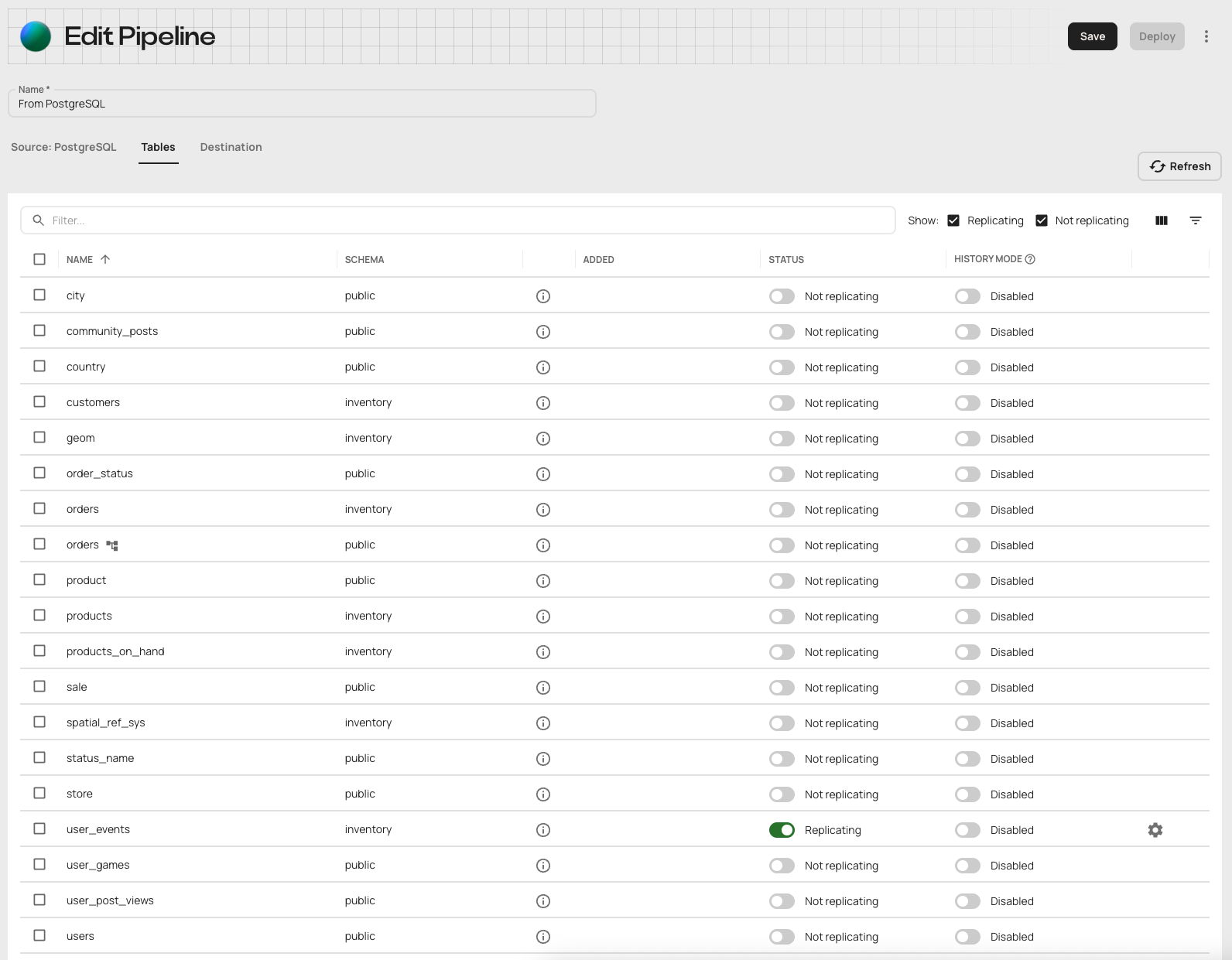
1. Navigate to the `Tables` tab in the pipeline.
Make sure that the source and destination are set and the desired table is set to `Replicating`.
Click on the gear icon.
 2. In the advanced table settings modal, check the checkbox for `Enable soft partitioning`.
3. Choose an immutable column to partition by (e.g. `created_at`), a partition frequency, and the maximum number of old partitions to maintain.
2. In the advanced table settings modal, check the checkbox for `Enable soft partitioning`.
3. Choose an immutable column to partition by (e.g. `created_at`), a partition frequency, and the maximum number of old partitions to maintain.
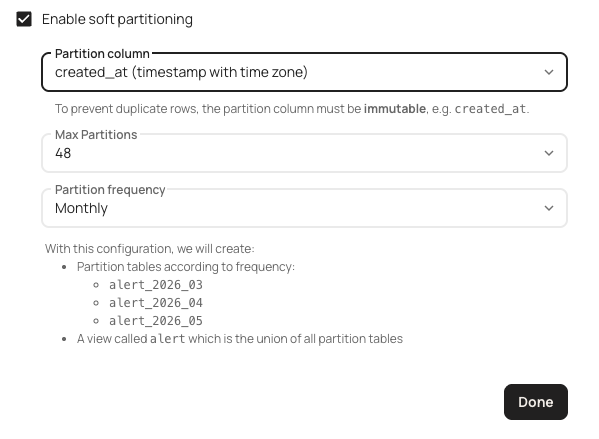 4. Click `Done` and save the pipeline.
5. Deploy the pipeline. Validation will fail if a table exists in the destination with the same name as the view (in this case, `alert`).
You may choose to rename the existing table or contact us for a one time migration.
6. After enabling soft partitioning, a recurring job runs in the background to manage the view and the partitioned tables. You will receive a notification about
actions performed as part of this job (for example, creation of new partition tables).
It is not recommended to create objects that depend on the unified view or partition tables as that will interfere with the view management actions that are run periodically.
These actions include:
* Creation of new partition tables. (Unified view is recreated to include the new tables)
* Compaction of old partition tables. (Unified view is recreated to exclude the old tables)
* Adding new columns to all managed tables and views. (Unified view is recreated to include the new column)
Destination-specific recommendations:
* Redshift
* Consider using [late-binding views](https://docs.aws.amazon.com/redshift/latest/dg/r_CREATE_VIEW.html#r_CREATE_VIEW_usage_notes) instead of standard views.
```sql theme={null}
SELECT
dependent_ns.nspname as dependent_schema,
dependent_view.relname as dependent_view,
source_ns.nspname as source_schema,
source_table.relname as source_table,
pg_attribute.attname as column_name
FROM
pg_depend JOIN pg_rewrite ON pg_depend.objid = pg_rewrite.oid
JOIN pg_class as dependent_view ON pg_rewrite.ev_class = dependent_view.oid
JOIN pg_class as source_table ON pg_depend.refobjid = source_table.oid
JOIN pg_attribute ON pg_depend.refobjid = pg_attribute.attrelid AND pg_depend.refobjsubid = pg_attribute.attnum
JOIN pg_namespace dependent_ns ON dependent_ns.oid = dependent_view.relnamespace
JOIN pg_namespace source_ns ON source_ns.oid = source_table.relnamespace
WHERE
source_ns.nspname = '' AND
source_table.relname = ''
ORDER BY 1,2;
```
* Snowflake
* [Queries to check for dependent objects](https://docs.snowflake.com/en/user-guide/object-dependencies#impact-analysis-find-the-objects-referenced-by-a-table)
## Target Workloads
While soft partitioning can work for any datasets with a timestamp column, it's particularly effective for:
### Time-Series, Append-Only Data
* Event streaming
* IoT sensor data
* Transaction logs
* Application metrics
### High-Volume Ingestion Pipelines
* Where the cost of updating large tables is high
* Merge workloads that often target recent slices of data
* Scenarios requiring predictable ingestion performance
## Benefits
* **Faster ingestion and better performance**: Smaller, time-based partitions
enable quicker writes and allow queries to efficiently target specific time
ranges, improving overall performance.
* **Reduced lock contention**:
Operations on different partitions occur independently, minimizing blocking
and improving concurrency.
* **Simplified data management**: Data is clearly
separated by time periods, making it easier to manage, maintain, and apply
flexible retention policies-old partitions can be dropped, compressed, or
archived as needed.
* **Lower storage and compute costs**: Only relevant
partitions are scanned during queries, reducing compute usage, and older data
can be archived or compressed to save on storage.
* **Predictable scaling and costs**: Ingestion and query performance remain consistent as data volume
grows, ensuring costs and resource usage are easier to forecast.
* **Database agnostic**: Soft partitioning works consistently across different database
systems, providing operational flexibility.
4. Click `Done` and save the pipeline.
5. Deploy the pipeline. Validation will fail if a table exists in the destination with the same name as the view (in this case, `alert`).
You may choose to rename the existing table or contact us for a one time migration.
6. After enabling soft partitioning, a recurring job runs in the background to manage the view and the partitioned tables. You will receive a notification about
actions performed as part of this job (for example, creation of new partition tables).
It is not recommended to create objects that depend on the unified view or partition tables as that will interfere with the view management actions that are run periodically.
These actions include:
* Creation of new partition tables. (Unified view is recreated to include the new tables)
* Compaction of old partition tables. (Unified view is recreated to exclude the old tables)
* Adding new columns to all managed tables and views. (Unified view is recreated to include the new column)
Destination-specific recommendations:
* Redshift
* Consider using [late-binding views](https://docs.aws.amazon.com/redshift/latest/dg/r_CREATE_VIEW.html#r_CREATE_VIEW_usage_notes) instead of standard views.
```sql theme={null}
SELECT
dependent_ns.nspname as dependent_schema,
dependent_view.relname as dependent_view,
source_ns.nspname as source_schema,
source_table.relname as source_table,
pg_attribute.attname as column_name
FROM
pg_depend JOIN pg_rewrite ON pg_depend.objid = pg_rewrite.oid
JOIN pg_class as dependent_view ON pg_rewrite.ev_class = dependent_view.oid
JOIN pg_class as source_table ON pg_depend.refobjid = source_table.oid
JOIN pg_attribute ON pg_depend.refobjid = pg_attribute.attrelid AND pg_depend.refobjsubid = pg_attribute.attnum
JOIN pg_namespace dependent_ns ON dependent_ns.oid = dependent_view.relnamespace
JOIN pg_namespace source_ns ON source_ns.oid = source_table.relnamespace
WHERE
source_ns.nspname = '' AND
source_table.relname = ''
ORDER BY 1,2;
```
* Snowflake
* [Queries to check for dependent objects](https://docs.snowflake.com/en/user-guide/object-dependencies#impact-analysis-find-the-objects-referenced-by-a-table)
## Target Workloads
While soft partitioning can work for any datasets with a timestamp column, it's particularly effective for:
### Time-Series, Append-Only Data
* Event streaming
* IoT sensor data
* Transaction logs
* Application metrics
### High-Volume Ingestion Pipelines
* Where the cost of updating large tables is high
* Merge workloads that often target recent slices of data
* Scenarios requiring predictable ingestion performance
## Benefits
* **Faster ingestion and better performance**: Smaller, time-based partitions
enable quicker writes and allow queries to efficiently target specific time
ranges, improving overall performance.
* **Reduced lock contention**:
Operations on different partitions occur independently, minimizing blocking
and improving concurrency.
* **Simplified data management**: Data is clearly
separated by time periods, making it easier to manage, maintain, and apply
flexible retention policies-old partitions can be dropped, compressed, or
archived as needed.
* **Lower storage and compute costs**: Only relevant
partitions are scanned during queries, reducing compute usage, and older data
can be archived or compressed to save on storage.
* **Predictable scaling and costs**: Ingestion and query performance remain consistent as data volume
grows, ensuring costs and resource usage are easier to forecast.
* **Database agnostic**: Soft partitioning works consistently across different database
systems, providing operational flexibility.