> ## Documentation Index
> Fetch the complete documentation index at: https://artie.com/docs/llms.txt
> Use this file to discover all available pages before exploring further.
# Schema evolution
> Learn how Artie automatically evolves schemas to match your data.
## Overview
Artie supports schema evolution out of the box, which means:
* We automatically **create** tables in your destination if they don't exist
* We detect and **add new columns** automatically
* We can drop deleted columns from the source (optional feature)
### How do we know the right data types? 🔍
* We automatically detect data types from your source schema and values
* For more details, see our [typing library documentation](/docs/guides/artie/arties-typing-library#data-type-handling-%F0%9F%94%8D)
You can enable this feature by setting `Enable hard deletes for columns` to `true` in your destination's advanced settings.
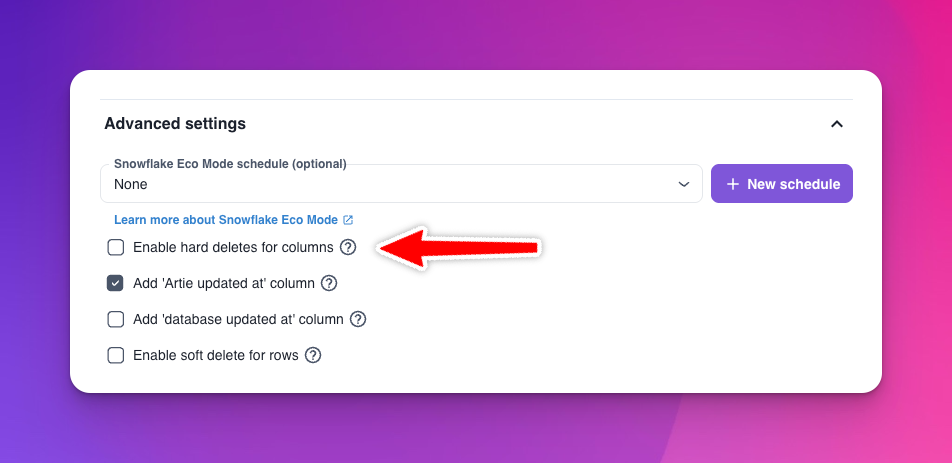 For safety reasons, columns are not automatically dropped from destination tables since this operation is nearly irreversible. While some destinations support undos, we implement a strict safety check process:
1. When a column is deleted from the source, the first row that omits this column marks it for potential removal
2. We then monitor CDC events for 4 hours to ensure the column is consistently omitted
3. Only after this verification period will we proceed with dropping the column
This safety mechanism helps prevent accidental data loss and ensures the column is truly no longer needed.
### Advanced Features 🛠️
We provide additional configuration options to give you more control over schema evolution:
Use column exclusion to prevent specific columns from being added to your destination. This is particularly useful for:
* Excluding sensitive data columns (e.g., PII, passwords)
* Preventing unnecessary columns from being synced
* Managing storage costs by excluding large or unused columns
To use this feature, simply specify the columns you want to exclude in your table's advanced settings.
Column inclusion allows you to explicitly define which columns should be synced to your destination. This feature:
* Gives you complete control over your destination schema
* Helps maintain a clean, minimal dataset
* Requires manual management of new columns
Column inclusion is mutually exclusive with column exclusion. When using this feature, you'll need to manually add any new columns to your destination schema as they appear in the source.
For safety reasons, columns are not automatically dropped from destination tables since this operation is nearly irreversible. While some destinations support undos, we implement a strict safety check process:
1. When a column is deleted from the source, the first row that omits this column marks it for potential removal
2. We then monitor CDC events for 4 hours to ensure the column is consistently omitted
3. Only after this verification period will we proceed with dropping the column
This safety mechanism helps prevent accidental data loss and ensures the column is truly no longer needed.
### Advanced Features 🛠️
We provide additional configuration options to give you more control over schema evolution:
Use column exclusion to prevent specific columns from being added to your destination. This is particularly useful for:
* Excluding sensitive data columns (e.g., PII, passwords)
* Preventing unnecessary columns from being synced
* Managing storage costs by excluding large or unused columns
To use this feature, simply specify the columns you want to exclude in your table's advanced settings.
Column inclusion allows you to explicitly define which columns should be synced to your destination. This feature:
* Gives you complete control over your destination schema
* Helps maintain a clean, minimal dataset
* Requires manual management of new columns
Column inclusion is mutually exclusive with column exclusion. When using this feature, you'll need to manually add any new columns to your destination schema as they appear in the source.