> ## Documentation Index
> Fetch the complete documentation index at: https://artie.com/docs/llms.txt
> Use this file to discover all available pages before exploring further.
# Artie's typing library
> Learn how Artie's internal typing library ensures data integrity and schema evolution across your data sources.
## Overview 🎯
Artie's custom [typing library](https://github.com/artie-labs/transfer/tree/master/lib/typing) is the backbone of our data transfer system. It ensures that your data maintains its original structure and types when moving between sources and destinations.
### Key Features ✨
* **Schema Evolution**: Automatically detects and adds missing columns
* **Type Inference**: Intelligently determines data types from values
* **Performance**: 2x faster than Go's Reflect library
* **Data Integrity**: Zero data transformation or loss
## Schema Propagation Behavior
Artie's typing library governs when schema changes are picked up and reflected downstream - which depends on whether your source is relational or non-relational.
### Relational Sources (e.g., Postgres, MySQL)
* Artie reads the source schema directly
* New tables and columns are synced immediately, even when values are all NULL
* No need to wait for populated data - schema updates are applied on first detection
### Non-Relational Sources (e.g., DynamoDB, MongoDB)
Here, schemas are not strictly defined, so Artie takes a more cautious approach:
* New columns are typed based on the first not-NULL value
* If a new column or table only contains NULLs, it won’t be propagated until real data shows up
* This helps avoid guessing or applying incorrect types based on incomplete information
> 💡 **Pro Tip**: For non-relational sources, insert a row with actual values to trigger schema propagation downstream - Artie will inspect the data type and infer the correct type in the destination.
## Data Type Handling 🔍
Artie's typing library intelligently handles data type mapping between your source and destination systems. Here's how it works:
1. **Initial Type Detection**: When data first arrives, Artie analyzes the source schema and values to determine the most appropriate data type for your destination.
2. **Type Preservation**: Once a data type is established in your destination, Artie uses the destination schema as a source of truth and maintains that type to ensure consistency.
3. **Data Type Conversion**: If source and destination types differ, Artie automatically converts the data while preserving its integrity.
If Artie encounters a type conversion that could lead to data loss or errors, we'll:
* Raise a clear error message
* Notify you immediately
* Work with you to resolve the issue
### Numbers
We preserve the exact numeric type from your source (Postgres, MySQL, or MongoDB). Here's how we handle different number formats:
* `5` → Integer
* `"5"` → String
* `5.0` → Float
### JSON Objects
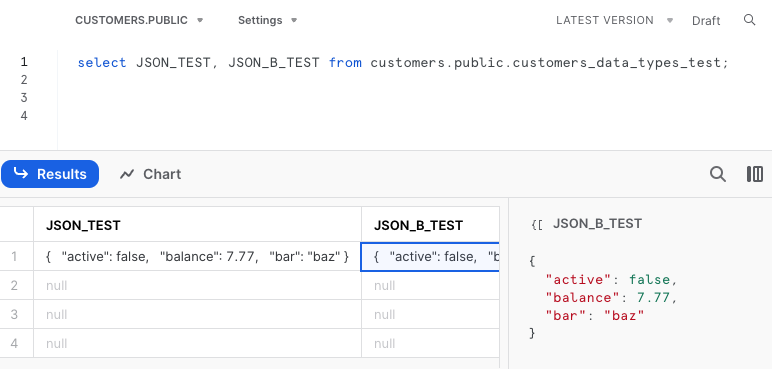
We maintain JSON objects exactly as they appear in your source, with no flattening or transformation.
 > 💡 **Pro Tip**: If you prefer to store JSON as a string, you can explicitly specify the column type as `STRING` in your schema.
### Arrays
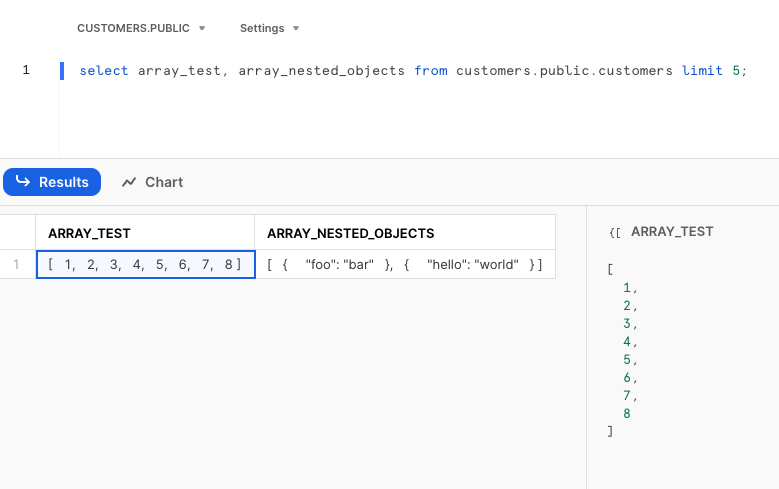
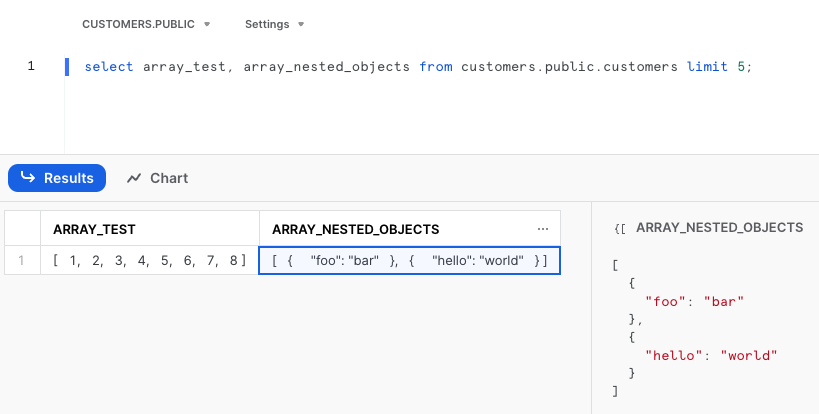
We support both simple and complex array structures:
* Simple arrays
* Nested arrays with objects
> 💡 **Pro Tip**: If you prefer to store JSON as a string, you can explicitly specify the column type as `STRING` in your schema.
### Arrays
We support both simple and complex array structures:
* Simple arrays
* Nested arrays with objects
 ### Timestamps, Dates, and Times ⏰
Our library supports 15+ different time formats with zero precision loss. We preserve your original time layout using our custom `time.Time` object.
> 💡 **Pro Tip**: Like JSON objects, you can override time type inference by specifying your preferred data type in the schema.
## Advanced
A variable numeric column in Postgres requires special handling when transferring to different destinations. By default, we will create this type as a string equivalent column so that we do not have to trade off data precision. You can override this behavior by modifying the destination column type.
> Why do we treat a variable numeric column differently?
We treat this column type differently because Postgres will allow you to *store arbitrary amount of digits* in each cell up to the implementation limit. This exceeds most destination's numeric data type limits, as such we will create a string equivalent column to preserve data precision.
## Need Help? 🤝
If you have questions not covered here, reach out to us at [hi@artie.com](mailto:hi@artie.com)!
### Timestamps, Dates, and Times ⏰
Our library supports 15+ different time formats with zero precision loss. We preserve your original time layout using our custom `time.Time` object.
> 💡 **Pro Tip**: Like JSON objects, you can override time type inference by specifying your preferred data type in the schema.
## Advanced
A variable numeric column in Postgres requires special handling when transferring to different destinations. By default, we will create this type as a string equivalent column so that we do not have to trade off data precision. You can override this behavior by modifying the destination column type.
> Why do we treat a variable numeric column differently?
We treat this column type differently because Postgres will allow you to *store arbitrary amount of digits* in each cell up to the implementation limit. This exceeds most destination's numeric data type limits, as such we will create a string equivalent column to preserve data precision.
## Need Help? 🤝
If you have questions not covered here, reach out to us at [hi@artie.com](mailto:hi@artie.com)!