> ## Documentation Index
> Fetch the complete documentation index at: https://artie.com/docs/llms.txt
> Use this file to discover all available pages before exploring further.
# Redshift
> Learn how to configure Amazon Redshift as a destination in Artie, including endpoint setup, schema configuration, service account creation, and required database permissions.
## Required settings
* Redshift endpoint
* Schema name
* Service account
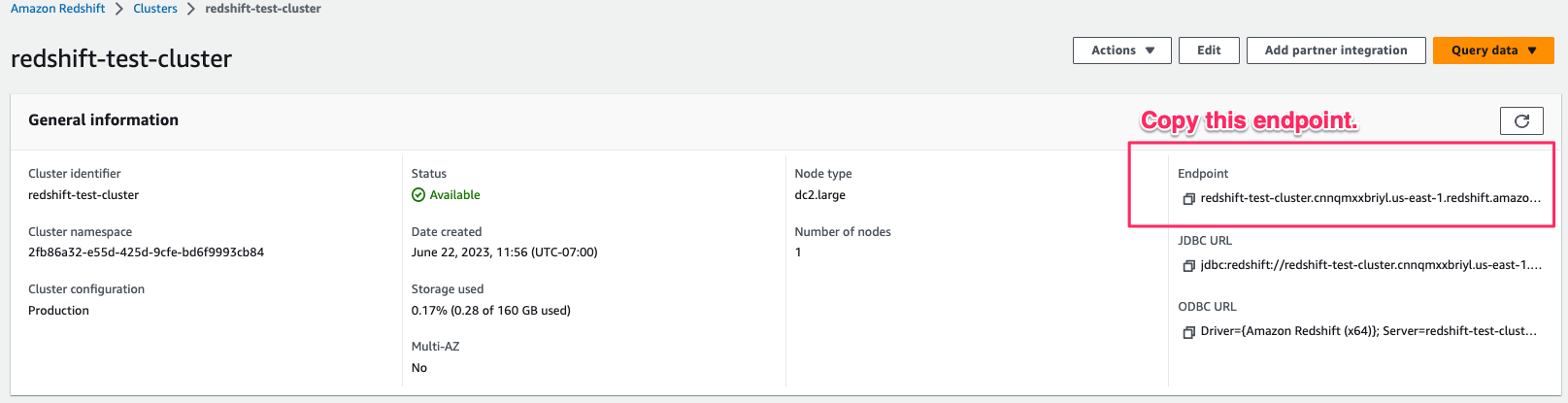 ### Creating a service account
```sql theme={null}
CREATE USER artie_transfer WITH PASSWORD 'password';
GRANT SELECT, INSERT, UPDATE, DELETE, DROP, ALTER ON ALL TABLES IN SCHEMA schema_name TO artie_transfer;
GRANT CREATE, USAGE ON SCHEMA schema_name TO artie_transfer;
```
### Advanced
Artie will create the table with a [SUPER](https://docs.aws.amazon.com/redshift/latest/dg/r_SUPER_type.html) data type if the source data is JSON.
This is useful:
* It allows you to use the data as-is without having to parse it into a JSON value.
* It allows you to store data up to 16MB rather than the `VARCHAR(MAX)` limit of 65,535 bytes.
### Creating a service account
```sql theme={null}
CREATE USER artie_transfer WITH PASSWORD 'password';
GRANT SELECT, INSERT, UPDATE, DELETE, DROP, ALTER ON ALL TABLES IN SCHEMA schema_name TO artie_transfer;
GRANT CREATE, USAGE ON SCHEMA schema_name TO artie_transfer;
```
### Advanced
Artie will create the table with a [SUPER](https://docs.aws.amazon.com/redshift/latest/dg/r_SUPER_type.html) data type if the source data is JSON.
This is useful:
* It allows you to use the data as-is without having to parse it into a JSON value.
* It allows you to store data up to 16MB rather than the `VARCHAR(MAX)` limit of 65,535 bytes.