> ## Documentation Index
> Fetch the complete documentation index at: https://artie.com/docs/llms.txt
> Use this file to discover all available pages before exploring further.
# S3 Tables
> Learn how to configure Amazon S3 Tables as an Iceberg destination in Artie, including table bucket setup and IAM service account permissions.
## Required settings
* Table Bucket ARN
* Service account
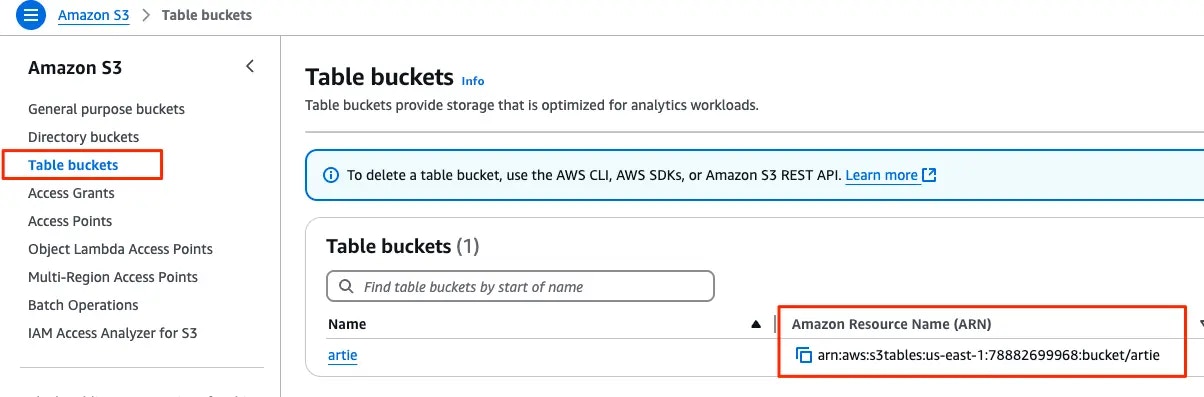
To find your table bucket ARN, go to your AWS console, click on S3 and navigate to the table bucket tab.
 ### Creating a service account
The service account will need S3 Tables API access.
```hcl theme={null}
variable "table_bucket_name" {
type = string
}
variable "service_account_name" {
type = string
}
// If the S3 Tables bucket is encrypted with KMS:
variable "kms_key_id" {
type = string
}
resource "aws_iam_role" "s3_tables_role" {
name = "S3TablesRole"
assume_role_policy = jsonencode({
Version = "2012-10-17",
Statement = [
{
Action = "sts:AssumeRole",
Principal = {
Service = "ec2.amazonaws.com"
},
Effect = "Allow",
Sid = ""
}
]
})
}
resource "aws_iam_policy" "s3_tables_policy" {
name = "S3TablesPolicy"
description = "Policy that grants access to S3 tables and related resources"
policy = jsonencode({
Version = "2012-10-17",
Statement = [
{
Effect = "Allow",
Action = [
"s3tables:CreateTable",
// DeleteTable is only required if you want to drop an existing table before backfilling.
"s3tables:DeleteTable",
"s3tables:GetTableBucket",
"s3tables:GetTableMetadataLocation",
"s3tables:ListTables",
"s3tables:GetNamespace",
"s3tables:ListNamespaces",
"s3tables:CreateNamespace",
"s3tables:DeleteNamespace"
],
Resource = [
"arn:aws:s3tables:*:*:bucket/${var.table_bucket_name}",
"arn:aws:s3tables:*:*:bucket/${var.table_bucket_name}/*"
]
},
{
Effect = "Allow",
Action = [
"s3tables:GetTable",
"s3tables:GetTableData",
"s3tables:GetTableMetadataLocation",
"s3tables:GetTableData",
"s3tables:PutTableData",
"s3tables:UpdateTableMetadataLocation"
],
Resource = [
"arn:aws:s3tables:*:*:bucket/${var.table_bucket_name}/table/*"
]
},
// If the S3 Tables bucket is encrypted with KMS:
{
Effect = "Allow",
Action = [
"kms:GenerateDataKey",
"kms:Decrypt",
],
Resource = [
"arn:aws:kms:::key/${var.kms_key_id}",
]
}
]
})
}
resource "aws_iam_role_policy_attachment" "s3_tables_role_policy_attachment" {
role = aws_iam_role.s3_tables_role.name
policy_arn = aws_iam_policy.s3_tables_policy.arn
}
resource "aws_iam_user" "s3_tables_user" {
name = var.service_account_name
path = "/"
}
resource "aws_iam_user_policy_attachment" "s3_tables_user_policy_attachment" {
user = aws_iam_user.s3_tables_user.name
policy_arn = aws_iam_policy.s3_tables_policy.arn
}
resource "aws_iam_access_key" "s3_tables_user_key" {
user = aws_iam_user.s3_tables_user.name
}
output "aws_access_key_id" {
value = aws_iam_access_key.s3_tables_user_key.id
sensitive = true
}
output "aws_secret_access_key" {
value = aws_iam_access_key.s3_tables_user_key.secret
sensitive = true
}
```
### Creating a service account
The service account will need S3 Tables API access.
```hcl theme={null}
variable "table_bucket_name" {
type = string
}
variable "service_account_name" {
type = string
}
// If the S3 Tables bucket is encrypted with KMS:
variable "kms_key_id" {
type = string
}
resource "aws_iam_role" "s3_tables_role" {
name = "S3TablesRole"
assume_role_policy = jsonencode({
Version = "2012-10-17",
Statement = [
{
Action = "sts:AssumeRole",
Principal = {
Service = "ec2.amazonaws.com"
},
Effect = "Allow",
Sid = ""
}
]
})
}
resource "aws_iam_policy" "s3_tables_policy" {
name = "S3TablesPolicy"
description = "Policy that grants access to S3 tables and related resources"
policy = jsonencode({
Version = "2012-10-17",
Statement = [
{
Effect = "Allow",
Action = [
"s3tables:CreateTable",
// DeleteTable is only required if you want to drop an existing table before backfilling.
"s3tables:DeleteTable",
"s3tables:GetTableBucket",
"s3tables:GetTableMetadataLocation",
"s3tables:ListTables",
"s3tables:GetNamespace",
"s3tables:ListNamespaces",
"s3tables:CreateNamespace",
"s3tables:DeleteNamespace"
],
Resource = [
"arn:aws:s3tables:*:*:bucket/${var.table_bucket_name}",
"arn:aws:s3tables:*:*:bucket/${var.table_bucket_name}/*"
]
},
{
Effect = "Allow",
Action = [
"s3tables:GetTable",
"s3tables:GetTableData",
"s3tables:GetTableMetadataLocation",
"s3tables:GetTableData",
"s3tables:PutTableData",
"s3tables:UpdateTableMetadataLocation"
],
Resource = [
"arn:aws:s3tables:*:*:bucket/${var.table_bucket_name}/table/*"
]
},
// If the S3 Tables bucket is encrypted with KMS:
{
Effect = "Allow",
Action = [
"kms:GenerateDataKey",
"kms:Decrypt",
],
Resource = [
"arn:aws:kms:::key/${var.kms_key_id}",
]
}
]
})
}
resource "aws_iam_role_policy_attachment" "s3_tables_role_policy_attachment" {
role = aws_iam_role.s3_tables_role.name
policy_arn = aws_iam_policy.s3_tables_policy.arn
}
resource "aws_iam_user" "s3_tables_user" {
name = var.service_account_name
path = "/"
}
resource "aws_iam_user_policy_attachment" "s3_tables_user_policy_attachment" {
user = aws_iam_user.s3_tables_user.name
policy_arn = aws_iam_policy.s3_tables_policy.arn
}
resource "aws_iam_access_key" "s3_tables_user_key" {
user = aws_iam_user.s3_tables_user.name
}
output "aws_access_key_id" {
value = aws_iam_access_key.s3_tables_user_key.id
sensitive = true
}
output "aws_secret_access_key" {
value = aws_iam_access_key.s3_tables_user_key.secret
sensitive = true
}
```