> ## Documentation Index
> Fetch the complete documentation index at: https://artie.com/docs/llms.txt
> Use this file to discover all available pages before exploring further.
# ClickHouse
> Configure ClickHouse Cloud as a destination in Artie with required settings including warehouse address, service account credentials, and setup instructions.
[ClickHouse Cloud Quick Start](https://clickhouse.com/docs/getting-started/quick-start/cloud)
## Required settings
After creating a warehouse in ClickHouse Cloud, you will need to
provide the following:
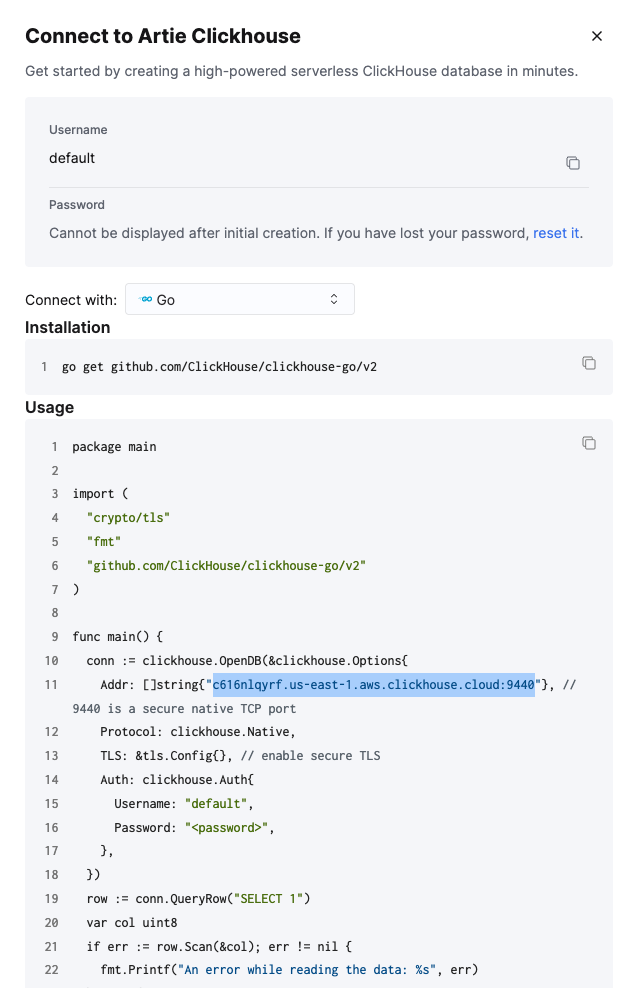
* Warehouse Address (for "Connect with:", select{" "}
"Go", then copy the address highlighted in the image
below)
* Service account username
* Service account password
### Creating a service account
```sql theme={null}
CREATE USER artie IDENTIFIED BY 'password';
GRANT CURRENT GRANTS ON *.* TO artie;
-- To be extra secure, you can also restrict the user to specific databases that they can see.
-- For example, this will exclude the service account from being able to see the "default" database.
REVOKE ALL ON default.* FROM artie;
```
### Retrieving the warehouse address